
Supplier Updates
Victoury has a new functionality for registering supplier down and rest payments. This change brought along several additions to the supplier side of the system that you can find detailed below.
Supplier Invoice Down and Rest Payment
Supplier Invoices can have registered down and rest payments. A supplier invoice can be created in:
Deal Details / Operations when creating a new supplier invoice
Deals Listing by checking a deal and clicking the pencil icon
The down and rest payment settings are available on the second step of the supplier invoice creation with four new fields that can be modified during the supplier invoice creation process:
Down Payment Due Date
Rest Payment Due Date
Down Payment
Rest Payment
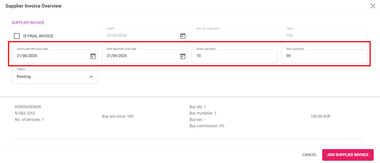
Modifying the Amounts and Due Dates
The values of these fields can be seen and modified in Supplier Invoice Details after the invoice has been saved. Modifying one of the down or rest payment amount fields also modifies the other field with the correct amount and updates the related Supplier Payment records.
Example
Total = 300
Payment registered = 100
Outstanding amount = 200
Changing the down payment to 20 will automatically set the rest payment to 180.
The fields are not editable anymore when there is no outstanding amount since both payment fields are zero in this case.
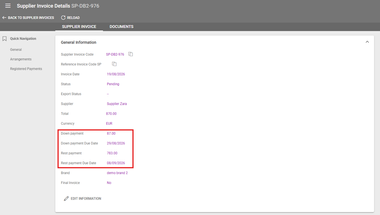
Grouped Supplier Payments by Supplier Invoice
Supplier payments are now grouped by supplier invoice. Previously, when a supplier invoice covered multiple arrangements within a deal, each arrangement generated its own separate payment record. Operators had to manually split and register payment amounts across each one individually.
With this update, all payments tied to the same supplier invoice are now consolidated into a single entry. In the Supplier Payments Listing and Supplier Details page, you'll now see one combined line per supplier invoice, showing the total amount, amount paid, down payment and rest payment values, and their respective due dates rather than a separate line for each arrangement.
New Section in Supplier Details for Financial Settings
A new section has been added to Supplier Details to set predefined down and rest payment preferences. These preferences are set per supplier in the respective supplier details. The down and rest payment due dates and amounts can be modified when creating the supplier invoice.
Down Payment % Value - the percentage used to calculate the down payment amount
Down Payment Due in Days - the amount of days used to calculate the down payment due date based on the date selected as the Supplier Invoice Date
Rest Payment Due in Days - the amount of days used to calculate the rest payment due date based on the date selected as the Supplier Invoice Date
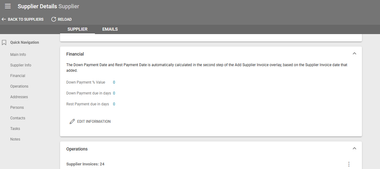
New Section in Supplier Invoices for Registered Payments
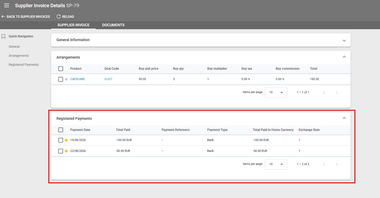
In Supplier Invoices Details, operators can see a new section for Registered Payments related to that invoice. The payment records contain the following information:
Payment Date
Total Paid
Payment Reference
Payment Type
Total Paid in Home Currency
Exchange Rate
New Advanced Search Filters
The Supplier Invoices Listing has the following new search filters:
Down Payment Due Date
Rest Payment Due Date
The Supplier Payments Listing has the following new search filters:
Supplier Invoice Code(s) - search by one or multiple supplier invoice codes. This search filter was updated to allow toggling between exact and approximate searches instead of free text input.
Currency - a single choice drop down list with values of the available Currencies set in Settings / Financial
New Columns in Supplier Invoices and Payments Listing and Export
With the addition of supplier invoice down and rest payments, several new columns are available in the Supplier Invoice and Payments Listing:
Down Payment Due Date
Down Payment Amount
Currency
Rest Payment Due Date
Rest Payment Amount
Currency
New columns are also available in the Excel export:
Down Payment Due Date
Down Payment Amount
Currency
Rest Payment Due Date
Rest Payment Amount
Currency
General Updates
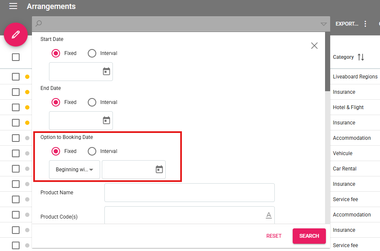
Arrangements - New Advanced Search Filter for Option to Booking Date and Status
In the Arrangements Listing, a new advanced search filter can be used to look for deals based on their Option to Booking Date or Status.
The Option to Booking Date filter has several options:
Fixed date that can begin with a specific date or be exactly on a specific date
or searching by an Interval of dates
The Status filter can be used by operators to search based on the existing Arrangement status options set in the system’s Choice Lists.
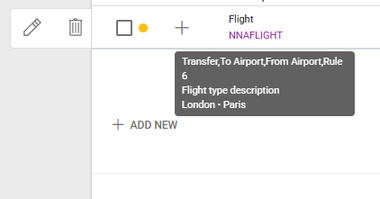
Arrangements - Hover an Arrangement to Display Type Description and Embark/Disembark Locations
More details are shown when hovering over Flight type arrangements in Deals Details / Arrangements.
The details displayed are as follows:
Price Type 1 to 4
Type Description
Embark and Disembark Locations
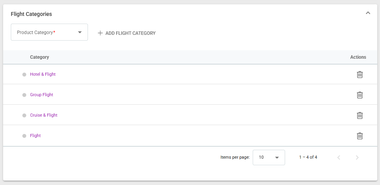
Flight product categories can be defined in Settings / General / Flight Categories.
Arrangements - Set Arrangement to Exclude from Buy in Deal Details / Arrangements
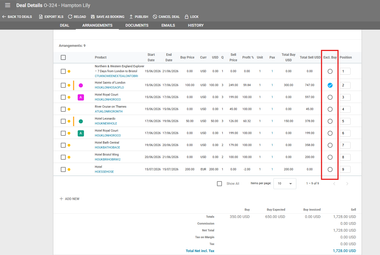
A new column is available in Deal Details / Arrangements to exclude one or more arrangements’ buy price from the calculation of the buy price. Checking or unchecking this box triggers a reload that instantly modifies the buy totals from the bottom section of the screen.
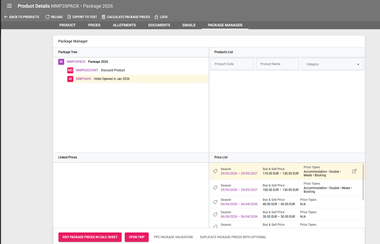
Package Manager - Open Price Details in A New Tab
A new button has been added to Product Details / Package Manager to open price details in a new tab.
Clicking on a product in the package tree displays its available prices in the prices list section. Hovering over a price displays the new button that opens the related price details in another tab.
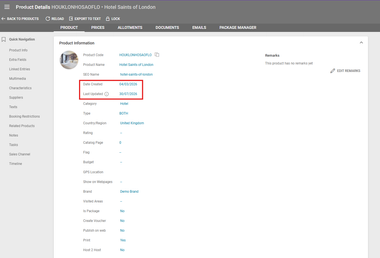
Products - Date Created and Last Updated
Two new fields have been added on the Product level to display the date when the product was created and the date when it was last updated. These fields aren’t editable and update automatically.
The Last Update date reflects changes to the Product's basic information only. Updates to related data, such as brands, visited areas, texts, package structure, multimedia, etc. are not included.
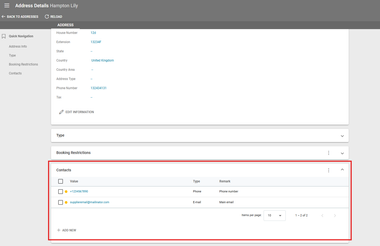
Addresses - Add Contacts for an Address
Contacts can be added to Addresses in the newly added section under Address Details / Contacts. This section is similar to the existing ones in Customer and Supplier Details and can be used to store contacts for physical addresses.
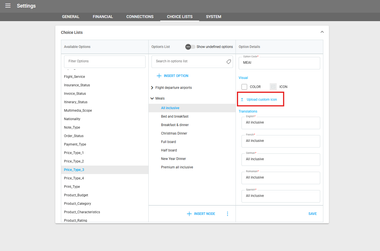
Choice Lists - Add Custom Icons to Options
Options from all Choice Lists can have customly uploaded icons. Operators can also choose from a list of predefined icons and set a custom color.
When uploading a new icon, the file format has to be SVG. Its color can be maintained or changed to the custom color selected for that option.
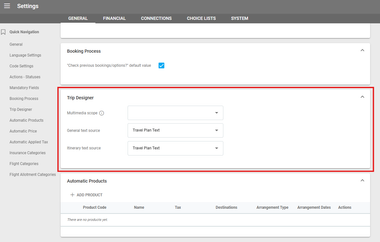
Trips - Predefine Multimedia Scopes and Text Source for Trip Products
A new section in Settings / General called Trip Designer allows operators to predefine several settings related to adding products in existing trips or creating trips from package products:
Multimedia Scope
If no scope is selected, the system migrates the main images of the product to the trip. If there are no main scope images, no images are migrated.
If a scope is selected, the system migrates only the images with the chosen scope. If there are no images with the selected scope, the system migrates the first 5 images regardless of their scope.
General text source: The text field from which the General text is migrated. Can be set to Travel Plan Text or Product Description
Itinerary text source: The text field from which the Itinerary text is migrated. Can be set to Travel Plan Text or Product Description
Product Prices - Rearrange Multimedia in Price Type Details
In a Product’s Details under the Prices tab, multimedia can be rearranged with drag and drop, allowing for easier image reordering.